
eZs3 Features
- What is eZs3
- HTML 5
- Player Features
- Quick Players
- Business Users
- The Underlay
- The Overlay
- Amazon S3 Account Management
- Amazon CloudFront & Streaming
- Bulk
- Security
eZs3 is a Software-As-A-Service for your media
eZs3 is like a plugin to your Amazon s3 account
By hosting your video and audio files at Amazon S3, you get fast, reliable and affordable hosting.
To turn those files into players which you can embed and play on the web - you need eZs3 !
You get awesome player options and designs, you protect your intellectual property and most importantly, you can save time.
Use eZs3 to put video on your webpage in 3 simple steps:-
-
Step 1 - upload your media to your own Amazon S3 account
-
Step 2 - create your a player with eZs3's great player features
-
Step 3 - paste the embed code and your video is on your webpage
"And that's all there is to it!"
Use the latest HTML 5 players
The important thing about HTML5 is that it is a consistent playback on ALL devices and is the supported standard moving forward
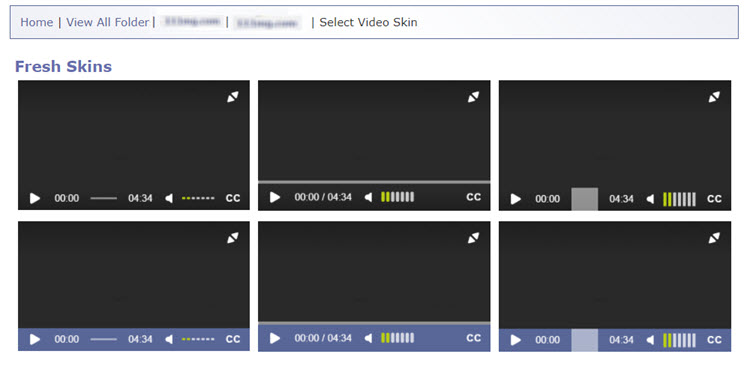
6 modern designs to choose from
-
colour customisable - to match your site designs
- responsive - fiit allscreen sizes
-
Set the dimensions of player - width and height - to fit your webpage
-
Set player to autoplay - your video starts as soon as your page opens
-
Add a start image - show any image you want before the start of your video
-
Video bug - assert your IP like Oprah, Jerry Springer or Judge Judy by placing a video bug in the corner of your video
-
Auto-update - any changes you make after embedding the player are automatically applied to the player, wherever it is
-
Create a video playlist or an mp3 jukebox using your players
-
Secure your media using the Amazons world class Domain Security
-
Get detailed statistics for your players to answer questions like: 'Do your viewers watch the video the whole way through?' 'Which countries do your audience come from?' 'Are your videos being re-watched?' by using Google Analytics to track your videos - learn more about Videolytics
After user feedback - we realised we needed a way to make players even quicker..
..so we created 'Quick Players'
Quick Players are templates that you can create, using all the usual player features, to suit your site
With a Quick Player template, you can create a player in one click!
The player can also be changed afterwards, if you wish
Or you can change the original template...
Or you can create as many templates as you like...
This feature is great if you want to create lots of players for one site or a set of training videos which all follow the same look
If you have a team of people, some uploading footage, others creating players and embedding on your site, you may need multiple access to your S3 account
But you don't want to share your log in details with a team - who can then access all of your files and folders in your account
To solve this problem eZs3 have created a Business User account - in 2 options
- up to 3 users
- up to 5 users
Both types allow you to manage your sub-users, cut off their access, hide your S3 keys and maintain your account security.
The Underlay
Use the Underlay to make your videos interactive. At the end of your video you can:-
- automatically re-direct viewers
- add a buy now button
- show an opt in form
- display a banner
- start a questionnaire
- include a survey
You can use any HTML code to appear at the end of your video, making a fully flexible tool
The Overlay
The Overlay allows you to add a sign up form or survey at any point in your video - encouraging your audience to actively participate with your media
The Overlay:
- is an opt in form, sign up form or survey
- shows at a point in the video specified by you
- pauses the video
- won't allow the video to restart until the form is completed
The Overlay helps you grow your list and turn viewers into subscribers
With eZs3 you can manage all aspects of your Amazon S3 account
- Create folders
Create folders in your S3 account for any of the four data regions (US Standard, Northern California, EU and Singapore) and choose whether to make it public or private
- Upload media
- Upload to your Amazon S3 account using either our Desktop File Manager, specifically created to avoid many content issues such as access permissions and file names
- Or use our Java applet, ideal for when you are on the go as it doesn't require downloading
- Download media
- Use a file download link or one of our uploaders to also download media from your account - great if you have a large team so you can easily share files pre- and post- editing
- Change access permissions
- Allow your viewers to watch your videos but keep raw files or other media private - easy to use panel allows you to choose whatever settings you want
- Create CloudFronts
- Create, delete, edit and update CloudFronts using eZs3 - see the CloudFront & Streaming section for more
CloudFront is a service provided by Amazon S3, which incurs extra charges. Up to date prices here.
With eZs3 you can create and manage your CloudFronts
Amazon CloudFront is a way of delivering your media that reduces latency, loading time and stuttering - making your video better and faster!
Using Adobe technology, you can also create streaming cloudfronts
With a streaming cloudfront you can achieve all the same things as with a normal cloudfront, but the viewer can also jump to any point in the video, forwards or backwards. You can also deliver even larger, better quality videos - with the same speed and reliability.
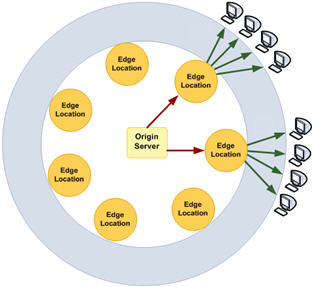
Amazon CloudFront allows you to serve up your data from edge servers - which are closer to your viewer and so speed up video delivery.
Amazon CloudFront can also now be served up from secure locations (https pages) - adding more protection to your file
With the Bulk Features, you speed up creating players and making changes.
The Bulk Features are only compatible with MP4 videos and MP3 audio files.
- Bulk Creator
- With the Bulk Creator you can select many files, and create a player for them. You will then get separate embed codes for each of the files, so you can post them on your website.
- Quick Bulk Creator
- Use the Quick Bulk Creator to select many files, then create a player using a template. This method means that you can create many players in 2 clicks! Again, you get an embed code per file so you can post on your site.
- Bulk Editor
- Want to update your start screen on many videos? Want to add a new watermark? Or use a new skin? Need to lock all your players to a new URL?
- Do any of these and more to many players at once by using the Bulk Editor.
- Select a whole bunch of players and apply only the changes you want
eZs3 helps to protect your Intellectual Property
- Watermark
With eZs3 you can add a video bug or watermark to your video like Jerry Springer or Oprah, marking your intellectual property. This is especially useful against pirates who screen record - your brand will always be on the pirated version
- Streaming
Choose to stream your content so that your video is not downloaded to your viewer's cache - making it more difficult for them to acquire a full copy of your video. eZs3 gives you full access to creating and managing streaming CloudFronts in your Amazon S3 account. See CloudFronts & Streaming for more info.
- Domain Security
eZs3 enables Amazon's Domain Securtiy feature to "lock down" your video player so that it will only play on the websites you select
If someone copies your embed code and pastes it on another site, the video will not play
If someone tried to grab the address of your file - it won't download!
